Free printable · 2 pages
Try eight target-number puzzles on paper
Practise addition and subtraction with connected tiles before opening the game. Page one has a worked example and eight puzzles; page two explains the answers, including routes that turn.
Download the worksheet and answers (PDF)No sign-in needed. Print page one for the learner and keep page two for checking. Accept other valid routes that reach the target.
How to play Math Worm
- Choose one topic. Start with calculations you can explain on paper. The topic menu includes addition, subtraction, multiplication, division, fractions, decimals and more.
- Read the target. Think of an expression that could make that number before searching the grid.
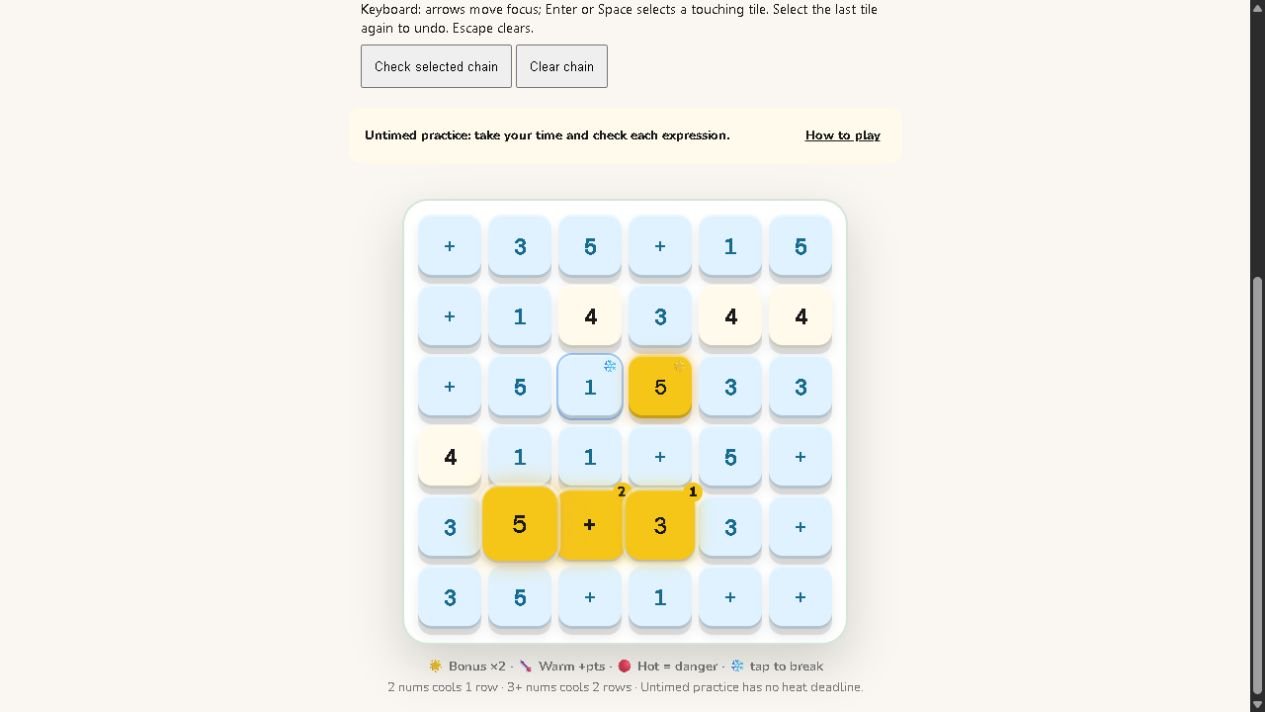
- Connect a route. Begin with a number, move through a touching operator to another number, then release. Tiles connect up, down, left or right—not diagonally.
- Check the whole expression. A useful pair of numbers is not enough if the operator between them is wrong. Watch the expression displayed above the board.
- Explain one answer. After a successful chain, say why it equals the target. Then try the next number.
The pictured round uses the Single Digit Addition topic. Boards and target numbers change, so your next game may look different.
Try the reasoning before playing
Target 8: why does 3 + 5 work?
Start at 3 and add 5: 4, 5, 6, 7, 8. In the screenshot, the 3 touches a plus tile, which touches a 5. Both the calculation and the route are valid.
You might also think of 4 + 4 or 5 + 3. Those are correct calculations, but you can only use them if the necessary tiles touch in a valid route. This is where planning matters.
Target 14: check the order of operations
When your chosen topic includes mixed operations, 2 + 3 × 4 equals 14: multiply 3 by 4 first, then add 2. Calculating everything from left to right would give 20, which is a different result.
Read the order-of-operations guide if that distinction is unfamiliar. The game is a place to practise a method you understand.
Choose a useful starting topic
The game groups topics under grade labels from 1 to 10. These are navigation aids, not a guarantee of alignment with every country's school year or curriculum. Choose by the mathematics your child is ready to practise.
- Early number work: counting, number bonds and single-digit addition or subtraction. Count objects first if the meaning of the operation is still unclear.
- Multiplication and division: begin with a familiar table. Use arrays or equal groups to explain a fact before playing.
- Fractions and decimals: the menu includes same-denominator fraction addition and decimal operations. Revisit adding fractions or adding decimals first.
- Later number work: percentage, negative-number and mixed-expression topics are available. Start with percentages of amounts or negative numbers if needed.
Use the controls that help you think
Untimed practice removes the heat deadline and lost lives; the control labels its score as local only. Use this mode when learning a topic or explaining a route aloud.
Select tiles without dragging lets you select a chain and press “Check selected chain”. Keyboard users can move focus with arrow keys and select touching tiles with Enter or Space. Select the last tile again to undo, or press Escape to clear.
If a target is getting in the way of practice, the untimed mode has a “New target (no penalty)” button. Changing a target is a chance to try fresh reasoning.
A short practice routine for parents
- Ask for one calculation on paper before opening the game.
- Play a few rounds in the matching topic. Ask “What number do you need next?” rather than pointing to the answer.
- Close the game and ask for a fresh example using the same method.
If the on-paper explanation is difficult, return to a guide or a visual model. A game score mixes calculation, route-finding and familiarity with the controls; it does not establish lasting mastery or diagnose a learning difficulty.
Questions before you start
Can I try Math Worm without an account?
Yes. The Play Math Worm button opens guest mode. Guest activity has limits; follow the game's sign-in prompt when you reach them. Do not assume a guest score will be saved to a student account.
Is this the same as a snake game where you eat answers?
This page describes BananaLearn's target-number tile game: you build an expression from connected tiles. The game hub also offers Worm Feast as a separate activity. Similar names elsewhere can refer to different games.
Does it work on a phone?
The game provides touch interaction and a no-drag selection option. On a small screen, use the selection controls if dragging feels awkward. It also provides keyboard controls for desktop play.
What should I do after playing?
Explain one successful chain and solve a different question without the board. Pick another topic only when the method is comfortable, or explore our other Maths practice games.
Ready to make your first target?
Open the topic menu and choose a calculation you already recognise. Keep untimed practice on while you learn the controls.
Choose a topic and play →