Learning · Parent guide
Disability Day 2026: An Accessible Learning Design Activity
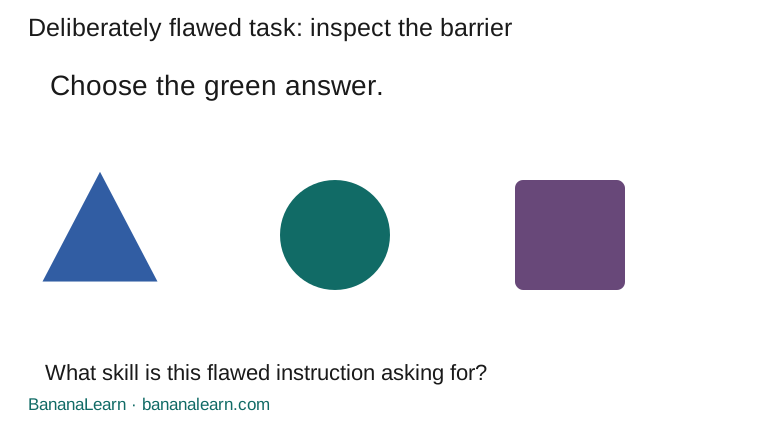
The instruction says choose the green answer, but the options have no labels. Could the task still work without relying on colour alone? Try improving the design before judging the learner.
Original BananaLearn guide · 2 November 2026
On a phone, swipe across the illustration to read every label.
Date, language and scope
The International Day of Persons with Disabilities is observed on 3 December; in 2026 it falls on a Thursday. The United Nations is the date source. This independent design activity does not claim an official 2026 theme or replace the perspectives of disabled people.
The task looks for avoidable barriers in a fictional learning sheet. It is not a simulation of disability, a diagnosis or an accessibility certification. Different people have different needs and preferences; an actual learner’s feedback should inform real adaptations.
Prepare a fictional task sheet
Write a simple shape-choice task with three options: a triangle, a circle and a square. In the first version, the instruction only says choose the green answer, while colour is the only way to distinguish the intended choice. The mathematical purpose is unclear. Label it deliberately flawed example.
Use paper, coloured pencils if available and ordinary pens. Allow about 30 minutes: 5 to read the task, 5 to identify barriers, 10 to redesign, 5 to ask for feedback and 5 to record the revision. There is no need for blindfolds, headphones blocking hearing or an exclusion exercise.
Identify what the task is actually assessing
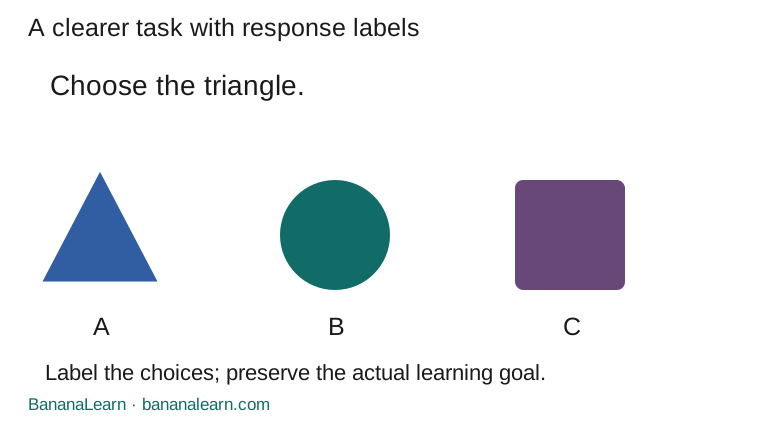
If the goal is recognising a triangle, the instruction should ask for a triangle and the options should be distinguishable by shape, not a private colour code. If the goal is matching a stated label, that label must be available in a usable form. A barrier can accidentally test something different from the intended skill.
Ask What must a learner notice? What action must they take? Which information is missing or hard to find? These questions move the discussion from a vague this looks nice to whether the task’s purpose and controls are understandable.
On a phone, swipe across the illustration to read every label.
Redesign with redundant cues and clear steps
A revised version could say Choose the triangle. Options A, B and C show distinct shapes and label the response choices. Do not name the correct option triangle if that would supply the concept being assessed. Colour can remain as an additional visual cue, but it is not the only cue. Put the instruction before the options and allow an answer by pointing, speaking or writing the option label where that matches the learning goal.
Use readable spacing and avoid placing an important instruction only inside a decorative picture. For digital content, meaningful images need an appropriate text alternative and keyboard-operable controls need attention. This paper activity introduces those ideas; it does not test a live website against every accessibility requirement.
Keep the challenge while removing unrelated barriers
Making an instruction clearer does not require revealing the answer to the target skill. If recognising a triangle is the goal, naming every option triangle would remove the question. An appropriate cue explains how to respond without doing the thinking being assessed.
For a more demanding version, use a sorting task with several shapes and an explicit rule. Ask which design choices support access and which accidentally change the task’s difficulty. The distinction depends on what the learning goal is, not simply on whether a clue makes the page easier.
Ask for feedback without assuming someone’s experience
Ask Can you find the instruction? How would you answer? What information would you need in another form? Give the other person time to respond and avoid claiming that their experience represents everyone with a particular disability.
Do not require a child to disclose a personal condition publicly. Do not describe a blindfold exercise as showing what it is like to be blind. The activity is a design review with ordinary feedback, not an attempt to recreate someone else’s life.
Worked revision record
A useful record could say Barrier: colour-only instruction. Intended skill: recognise a triangle. Revision: ask for the triangle directly and provide labelled options. Feedback: answer can be indicated by label or pointing. Still to check: the appropriate presentation for the actual learner and teaching setting.
This is an original fictional example. It shows a decision process, not evidence of a measured improvement in learning. A different task may need other changes, such as shorter directions, a text description, larger diagrams or another response method chosen with the learner.
Use the learning beyond the observance
Try the same review on an adult-selected non-private worksheet: purpose, instruction, information format, response method and feedback. Preserve the intended concept while checking avoidable barriers. Record remaining questions rather than calling the design universally accessible after one opinion.
The UN date supports the timing, and the W3C guidance supports the principle of not using colour as the only visual means of conveying information. Actual school adjustments and digital accessibility reviews need the relevant people and methods; this short activity is a useful introduction.
Learning-task redesign record
Copy this record into a notebook. Fill each blank using your own example or the activity above.
On a phone, swipe across a wide table to see every column.
| Question | Your observation |
|---|---|
| Intended skill | ___ |
| Barrier in the fictional task | ___ |
| Revision without giving away the concept | ___ |
| Feedback from a learner | ___ |
| Remaining checks | ___ |
10 questions with explained answers
Try each question first. Open the explanation to check your reasoning. These are original BananaLearn questions, not official exam questions.
When is the observance in 2026?
Check answer and reasoning
Thursday 3 December.
The UN annual date is 3 December.What is wrong with colour as the only instruction cue?
Check answer and reasoning
It may hide the required information from some learners.
A second usable cue can convey the same meaning.What should be decided before redesigning the sheet?
Check answer and reasoning
The intended learning skill.
Otherwise the revision may change what the task assesses.If the aim is recognising a triangle, what is a clearer instruction?
Check answer and reasoning
Choose the triangle.
It states the target concept instead of relying on an unexplained colour code.Must colour be removed completely?
Check answer and reasoning
No.
It can remain as an additional cue rather than the sole carrier of meaning.Does a blindfold exercise recreate blindness?
Check answer and reasoning
No.
This activity does not simulate a disability or claim someone else’s experience.Can learners use different response modes when appropriate to the goal?
Check answer and reasoning
Yes.
Speaking, pointing or writing a label may demonstrate the same target skill in this task.Does one successful redesign certify universal accessibility?
Check answer and reasoning
No.
Real people, contexts and accessibility criteria require further review.Name a useful feedback question.
Check answer and reasoning
For example, can you find the instruction and explain how to answer?
It checks task use rather than merely appearance.What should remain visible in the final record?
Check answer and reasoning
The barrier, intended skill, revision, feedback and remaining checks.
That makes the design decision understandable.
Choose your next learning step
- Identify a task’s actual learning purpose
- Check whether a learner can use the lesson task
- Discuss specific classroom supports
Explore BananaLearn games, learning resources and tutoring. Maths is our priority; English and Science tutoring are also available. Share your current schoolwork when checking teaching fit.
Sources and scope
Explanations, activities, diagrams and practice are original BananaLearn work. Class labels suggest a learning level; school sequences and current textbook editions can differ. Sources checked 2 November 2026.
- United Nations: International Day of Persons with Disabilities
- W3C: understanding the use-of-colour criterion
How we prepare guides · Report a correction
Share the complete guide: https://bananalearn.com/learn/disability-day-2026-accessible-learning-design.html